
Related Articles:
Activating Online Review Boost
Add Online Review Boost To Your Account
Before you can start using online review boost the feature needs to be added to your account. There's no extra charge for it, but is currently an opt-in feature.
Just contact us to have it turned on
Enabling Online Review Boost
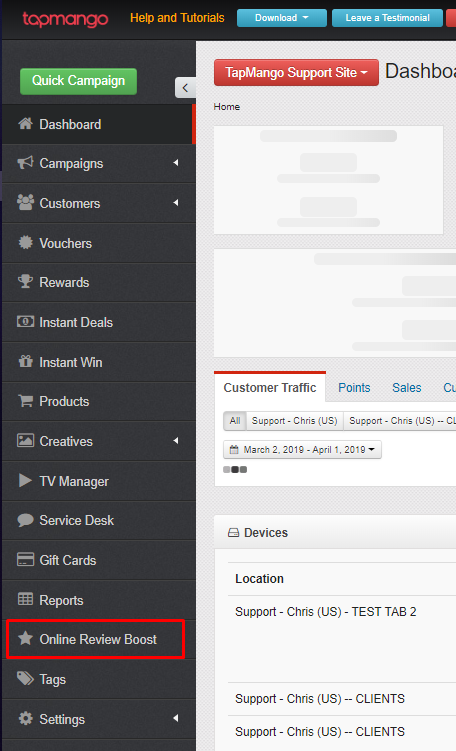
Once we've added the feature to your account you'll be able to see a tab online review boost on the left side of https://portal.tapmango.com
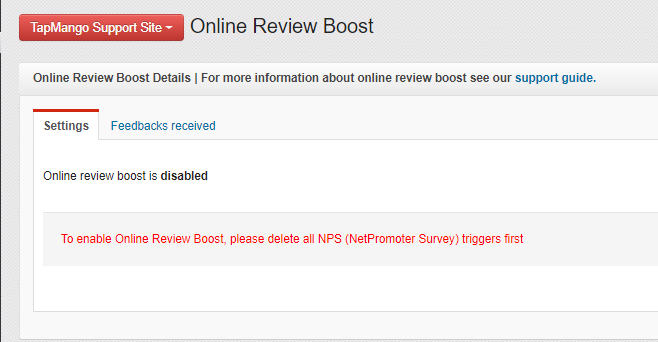
Disable Net Promoter
Online Review boost works by creating it's own, special net promoter campaign in your Campaign Manager. In order to turn on online review boost you'll need to first delete your existing net promoter campaign.
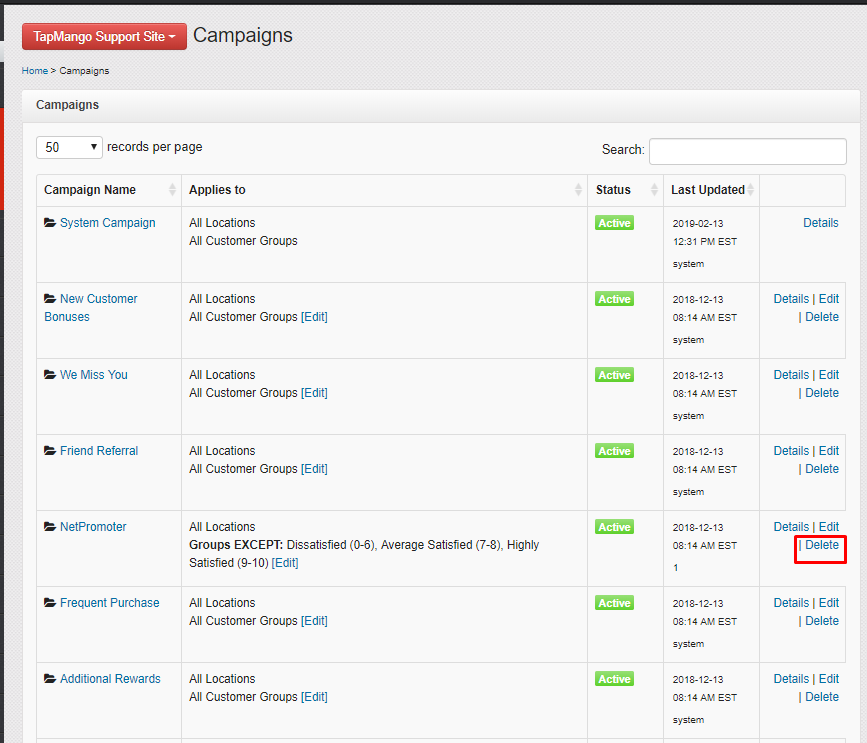
This is simple, just click campaigns > manage campaigns > delete next to your net promoter campaign.
Enable and Get Started
Once the campaign is deleted you can go back to online review boost and click enable. Now you can start choosing the options.
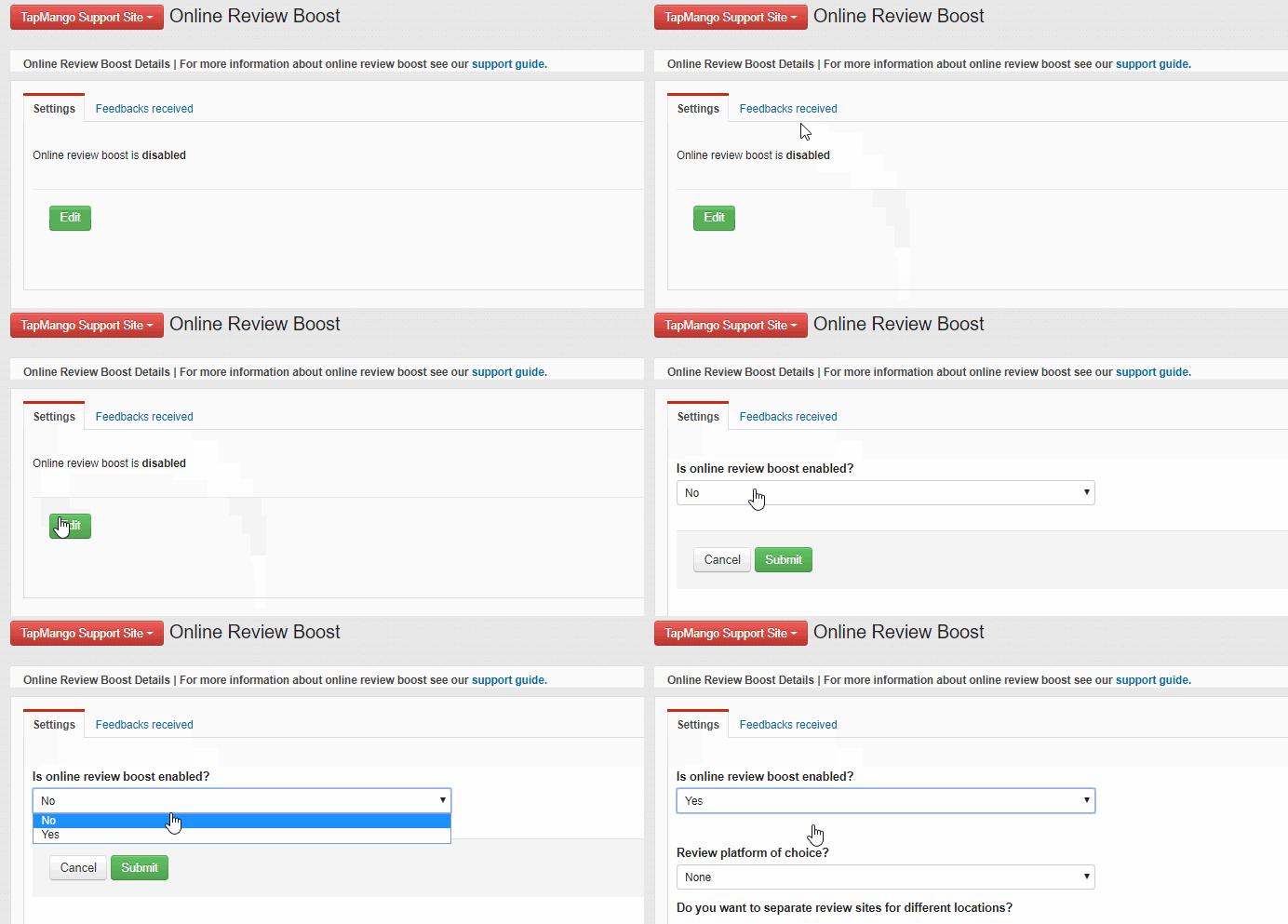
Setting Up Online Review Boost
There's a few options to pick when setting up online review boost. We'll go through them step by step. Just fill out the options then select submit when finished.
Review platform of choice?
This is what review platform you want to push your customers to if they meet the minimum rating level. You can also add a different review site for each location if you wish. Choose from the list:
- Yelp
- TripAdvisor
- Custom
You can copy+paste the link to your review page, or use the ID from the review site itself.
For google you can use google's tool to find your google places ID
https://developers.google.com/places/place-id
What minimum rating is considered to be positive?
Choose between 1 and 5 stars. This is the minimum rating level a customer must pick to be sent a message asking for a review on the platform you chose.
Request internal customer feedback on the tablet?
Choose yes for this if you'd like the leave feedback option to appear on the tablet. If you choose no then customers will only be requested feedback via email/sms using the method you pick in the next question.
When should we email/text request for feedback?
This is a list of conditions. Pick what best suits your needs. This is how a customer will be sent a text or email if they do not respond on the leave feedback option on the tablet.
| Condition | Description |
|
{COUNT} day(s) after a customer is added to ' {GROUP.DISPLAY}' group |
Notified a specified number of days after being added to selected group |
|
{COUNT} day(s) after a customer purchased '{PRODUCT.DISPLAY}' product |
Notified a specified number of days after purchasing a specified product |
|
When Customer achieves {POINTS} lifetime points |
Notified after reaching a specific amount of lifetime points |
| When Customer achieves {POINTS} points |
Notified after reaching a specific amount of current points |
|
When Customer Checks-in {COUNT} Days In a Row |
Notified when checking-in a specific number of days consecutively |
|
When Customer Checks-in {COUNT} time(s) |
Notified after checking in a specific number of times |
|
When Customer is Added to '{GROUP.DISPLAY}' Group |
Notified when being added to a specified group |
|
When Customer Makes {COUNT} Payment(s) |
Notified after making a specific number of payments (to earn points by dollar) |
|
When Customer Purchases '{PRODUCT.DISPLAY}' {COUNT} time(s) |
Notified after making a purchase of a TapMango product a specific number of times |
|
When Customer Purchases Product from Category '{PRODUCT_CATEGORY.DISPLAY}' {COUNT} time(s) |
Notified after making a purchase of a TapMango product category a specific number of times |
|
When Customer Redeems Reward '{REWARD.DISPLAY}' {COUNT} time(s) |
Notified after redeeming a specific reward a specific number of times |
|
When Customer Redeems Voucher '{VOUCHER.DISPLAY}' {COUNT} time(s) |
Notified after redeeming a specific voucher a specific number of times |
|
When Customer Wins '{PRIZE.DISPLAY}' {COUNT} time(s) |
Notified after winning a specific instant win prize a specific number of times |
What reward would you offer to get customer's feedback?
What you'd like to reward customers for leaving feedback:
- None
- Points
- Voucher
Would you like to be notified of every feedback by email?
If you'd like to be notified by email or not. If so what email address should you be notified with when someone leaves feedback.
Additional Questions?
As always, if you have any additional questions that isn't covered in this guide do not hesitate to contact us and we'll be happy to help.
Comments
0 comments
Article is closed for comments.