
Customer Segmentation is a key way to identify your best customers! A powerful method you can use to segment them is by Using Customer Filters. This set up will update automatically every 24 hours or when a campaign targeting that group is run.
To create Customer Groups, simply go to your Portal (portal.tapmango.com) and go to Customers -> Customer Groups and then click on the Create New option.
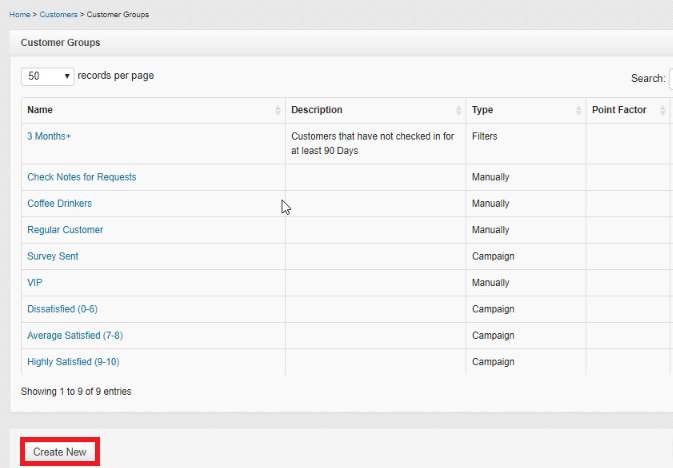
You can fill out the Description to explain what the group is for, or leave it blank and the Customer Filter will automatically populate that after you create the group.
Then, for How will customers be grouped? choose Using Customer Filters.
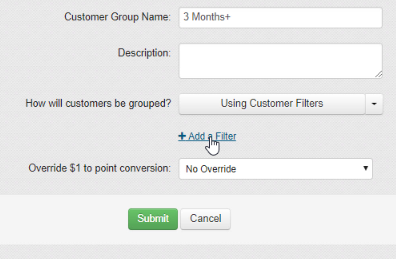
Now there are many, many choices for filters you can choose. Below we've created a breakdown of what each filter looks at and examples of how you could use it for your business!
Points
| Filter Name | What it looks at | Use Case Examples |
| have at least 'N' points | Looks at customer's current point value and will add it to the group as long as they have over N number of points |
Sending promos to customers who have enough points to redeem for a voucher |
| have less than 'N' points | Looks at customer's current point value and will add it to the group as long as they have less N number of points |
Reminding customers that they are close to earning the first Reward
|
| have at least 'N' lifetime points | Same as at least 'N' points but rather than look at current point balance, looks all points they've ever earned |
Can see who are your biggest spenders and regular users of the program. Creating membership tiers. (Ie: Gold Members are customers who have earned more than 200 points - click here for our video guide) |
| have earned less than 'N' lifetime points | Same as less than 'N' points but rather than look at current point balance, looks all points they've ever earned |
Creating a group for customers who aren't as active with the program or business Creating membership tiers. (Ie: Bronze Members are customers who have earned less than 50 points - click here for our video guide) |
| have earned 'X' points in the last 'N' days | Will look at how many points a customer has earned over the most recent 'N' number of days | If a customer needs to be earning a specific amount of point each month to stay a member of a specific group. |
Visits
| Filter Name | What it looks at | Use Case Examples |
| have not checked in for at least 'N' days | Looks at customer's last visit and see if it was over N days ago |
Creating Active/Inactive groups based on activity and how recently they came in to focus SMS promos on Active customers only. |
| checked in between 'N' and 'N' days ago |
Looks at customer's last visit and see if it lands between the Start Date and EndDate Value values. *Note StartDate must be the smaller value. |
Creating Active/Inactive groups based on activity. For example between 0 and 60 days ago will get customers who were in store within the last 2 months. |
| have checked in at least 'N' times | Looks at customer's total number of check-ins | Useful for identifying customers who come in regularly. |
| have check in less than 'N' times | Looks at customer's total number of check-ins | Identifying customers who haven't come in often |
| have never visited the store |
Only applies in a customer list was imported without a Last Check In Date. Looks at 'Last Checkin' and sees if it is set to 'Never' |
Identifying the imported customers who have never come in store. Can be used to send them specifically a promo to entice them to come in store. |
Sign Up
| Filter Name | What it looks at | Use Case Examples |
| signed up via 'N' |
Looks at method used to Register and to see if it is either:
|
By checking Sign Up via Referral you can see how many new customers have been brought in by friends. If this number is low you'll need to revisit your Friend Referral incentive to see if it is high enough! |
| signed up more than 'N' days ago | Looks at when customer registered for your program and will see if has been more than N days | |
| signed up less than 'N' days ago | Looks at when customer registered for your program and will see if has been less than N days | If you're running an employee incentive program for how many customers they've gotten to sign up, you can use this to see how many customers have signed up in the last week/month etc. |
Redemptions
| Filter Name | What it looks at | Use Case Examples |
| have redeemed 'X' Reward at least 'N' times | How many times a customer has redeemed a specific reward | |
| have never redeemed 'X' reward | How many customers have never redeemed a specific reward |
Can see how popular specific rewards are by how many people are in that group. If the number is extremely low, maybe you'll want to change that reward. |
| redeemed 'X' voucher at least 'N' times | How many times a customer has redeemed a specific voucher | |
| have not redeemed 'X' voucher | How many customers have never redeemed a specific voucher |
Use it to see how many people haven't redeemed a specific voucher Sending out a followup campaign to customers who haven't redeemed their voucher to remind them about it |
| let 'X' voucher expire | See if a specific voucher expired on their account | Can give these specific customers an extended alternate offer |
Communication
| Filter Name | What it looks at | Use Case Examples |
| opted-in to SMS in the last 'N' days | The date that a customer has given you consent to text them and if it happened within the last N days | Good for tracking metrics of how often customers are opting into the texting portion of the program |
| opened last sent email | If the last email was read | |
| opened an email in the last 'N' days | If the last email sent was read within the last N days | |
| didn't open last sent email | If the last email was read | |
| have email | If the email field on the customer profile is blank or not | To see easily how many customers have given you their email |
| have no email | If the email field on the customer profile is blank or not | |
| unsubscribed from SMS in the last 'N' days | The date a customer has unsubscribed from texting within the last N days | Tracking metrics of if recent campaign activity is making people more likely to unsubscribe |
| unsubscribed from Email in the last 'N' days | The date a customer has unsubscribed from email within the last N days | Tracking metrics of if recent campaign activity is making people more likely to unsubscribe |
Referral
| Filter Name | What it looks at | Use Case Examples |
| have referred at least 'N' friends | How many people a customer has referred and if it's more than N | Find out who has brought you more than N new customers |
| have referred at least 'N' friends in the last 'X' days | How many people a customer have referred within the last X days and if it's more than N | Making an elite 'Golden VIP' membership group for customers who refer a certain number of customers within the last month. |
Purchases
| Filter Name | What it looks at | Use Case Examples |
| have purchased 'X' product at least 'N' times | The number of a times a customer has purchased a specific product |
If a customer has bought a specific more than 3 times then you can automatically add them to that group. For example: After a customer has gotten a facial 3 times, add them to the Facials group so we can send them targeted |
| have purchased 'X' product in the last 'N' days | If a customer has purchased a specific product within the last N days | |
| have spent at least 'N' dollars in the last 'N' days | How much a customer has spent within the last N days | To create membership tiers that are maintained by spending a specific amount of money within the last N days |
| have spent less than 'N' dollars in the last 'N' days | How much a customer has spent within the last N days | To create membership tiers that are maintained by spending a specific amount of money within the last N days |
Customer Details
| Filter Name | What it looks at | Use Case Examples |
| have birthday in month 'X' | The month of their birthday | If you want to set up monthly specials for people with a birthday in a specific month. |
| have 'X' in custom field 'Y' | What a customer's response was for a specific field | Sorting customers based on custom captured field responses *talk to your account manager to get this set up |
| have 'X' as their home location |
What a customers home location is. This is set by whichever location they signed up at. If they check in 3 times consecutively at a different location, their location will switch to that. |
|
| have 'X' in notes | Looks for 'X' in a customers notes |
Useful for tracking specific things in customers notes. For example: have your employees add a "#theirname" to a customers notes to take credit for signing up a customer |
Memberships
| Filter Name | What it looks at | Use Case Examples |
| have membership expiring in 'N' days |
Using our Membership Module (*talk to your account manager to get this setup) It will look at how close a customer's membership is to expiring and will send out a message |
Can send out messages to customers who have their membership expiring soon. |
| expired membership |
Using our Membership Module (*talk to your account manager to get this setup) Will look at if their membership has expired |
Sending out promos to customers who have let their membership expire to remind them to renew it. |
Comments
0 comments
Please sign in to leave a comment.