
What is Instant Win?
Instant Win is a bonus offering for your customers designed to boost engagement, and excitement at checkout. It's a great way to give your customers a can't say no reason to come back and visit your store.
It's likely that some instant win prizes were set up with your initial consultation when you signed up for TapMango.
What does Instant Win Do?
Instant Win will initiate a small countdown sequence when your customer checks in to the TapMango tablet by entering their phone number, scanning their key tag, or scanning their mobile application.
The Instant Win feature will randomly select a prize from a list and award that to the customer's account.
How Does Instant Win Work?
Instant Win has a list of prizes available and will randomly select one. However, this works with some control as well - it's not just chaos.
You Set The Prizes
The prizes are completely in your control. There are two types of prizes you can set, points, or a voucher.
Points are just points, with a voucher you can set an expiration date.
It's also possible to restrict rewards to specific locations if you're a multi-location business.
You Set The Odds
When you create an instant win prize you decide on the odds. This is how often the prize can be won. Example: 1 in 10.
How Do The Odds Work?
Using the example above, 1 in 10 - this means for every 10 times the instant win game is played, 1 customer walks away with the prize. Which customer of the 10 is randomly decided, but the prize will never be issued more than once for every 10 plays.
An easy way to think of this is to imagine you print a set of 10 tickets. 9 LOSER and 1 WINNER. You shuffle the tickets up and each time a customer comes in you hand them a ticket. You do this until all 10 tickets are gone, regardless of when the winning ticket is handed out. Then repeat the process.

How Do I Turn Instant Win on or Off?
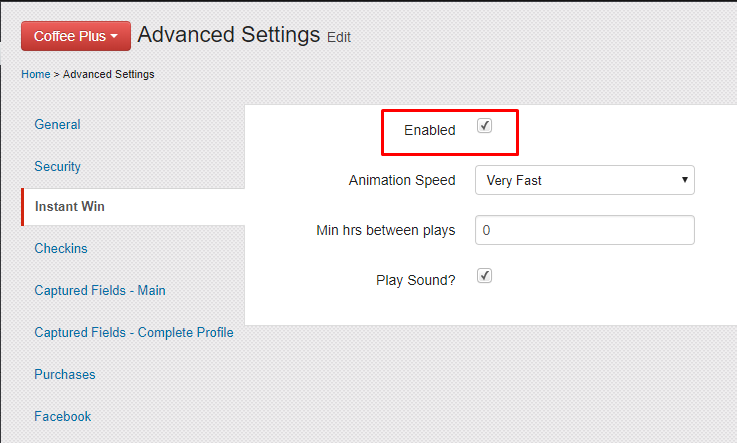
Instant Win is enabled by default, but you can disable it at any time!
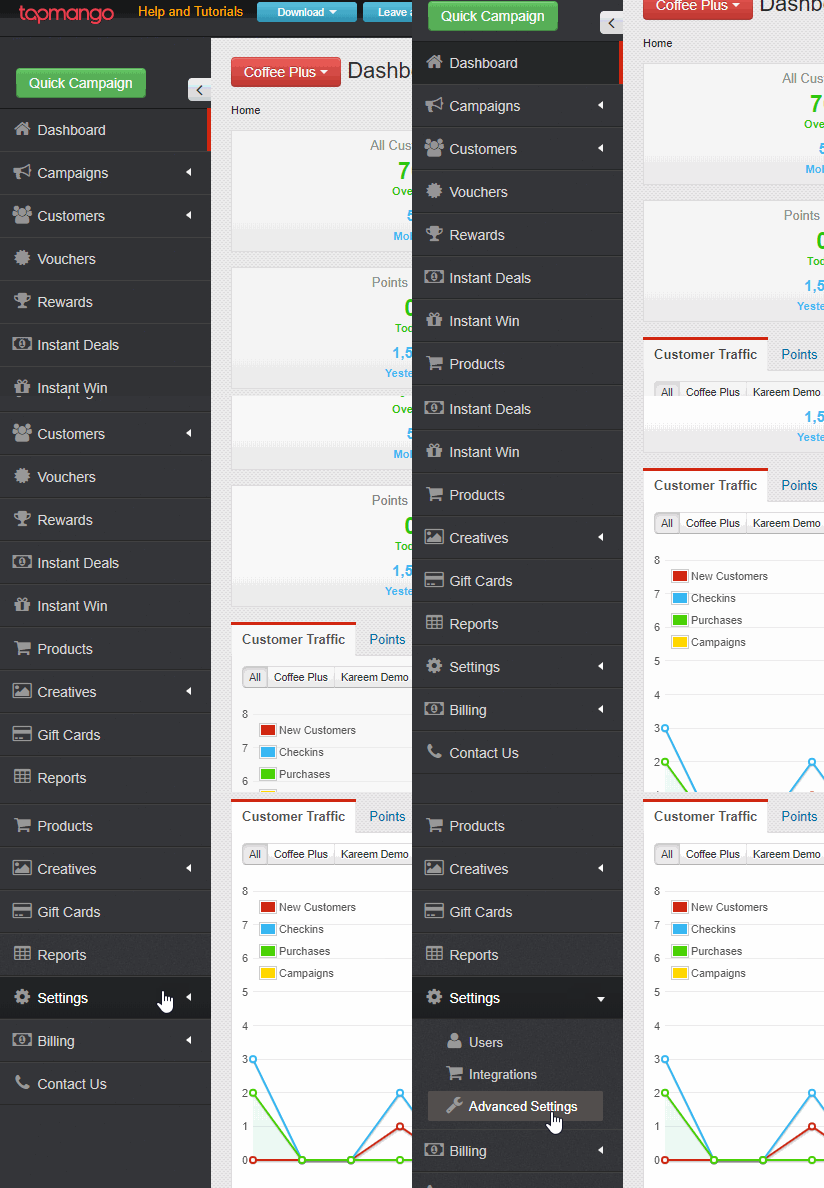
- On http://portal.tapmango.com navigate to settings > advanced settings > instant win
- Check Enabled and then Save at the bottom
What are the other settings?
Animation Speed
This is how fast the countdown plays. It can be set to Normal, Fast, or Very Fast.
Min Hrs Between Plays
This is how often customers can play the game. The default is 12 hours but it can be set to as low, or as high as you'd like it to be.
Play Sound?
If checked, the instant win game will play a sound on win/lose. Your tablet's volume must be turned on for this to to work.
How Do I Edit / Make Instant Win Prizes?
For information about actually using Instant Win see:
Instant Win - How Do I Manage My Prizes?
Have TapMango Online Ordering?
Instant Win can be added to Online Orders to give your customers increased opportunities if they're too busy to come in and order! Find out how here!
Questions?
If you have extra questions don't be shy and talk to us and we'll be happy to help!
Comments
0 comments
Article is closed for comments.