
app.tapmango.com
TapMango offers a virtual tablet as well. You're able to sign into a website to access the game services that your in-store cashier facing tablet would offer without needing to sign into portal.tapmango.com or have a one of TapMango's provided tablets.
Any Device
The virtual tablet will work on any device that supports a web browser such as:
- A smartphone
- Desktop web browser
- Tablet
- iPhone
- iPad
This way you or your staff can simply sign in and go
Ideal for Managing Orders
TapMango's virtual tablet is ideal for accepting and managing your online orders. As long as you have access to a device with a web browser you'll be able to manage your orders. Even on the go
How Does the Virtual Tablet Work?
You can start using the virtual tablet with your existing TapMango account in a few quick steps:
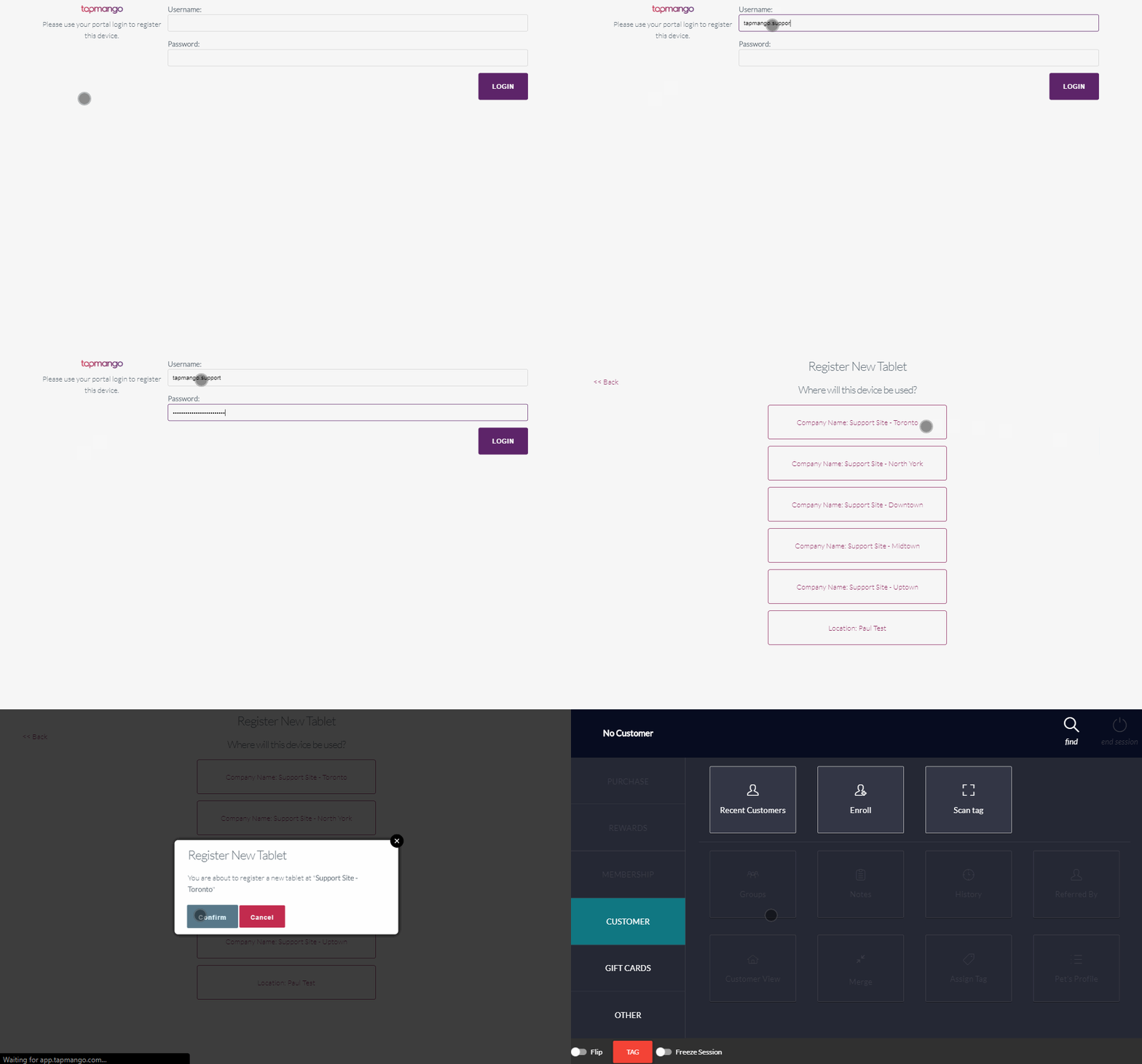
Sign in to app.tapmango.com
- Open a web browser on your device of choice
- Go to the website app.tapmango.com
- When prompted to sign in, use your login credentials for portal.tapmango.com
Pick Your Location
- Next you'll be asked to choose the location the virtual tablet is for
- Select the location, this will be remembered next time you open your browser
- If you only have a single TapMango location you won't see this option.
Ready To Go!
- Once you picked a location you'll be given the cashier side of a tapmango tablet on your screen
- This will allow managing customers and orders the same way as if you had one of our tablets
Things to be Aware Of
One Virtual Tablet Per Location
The virtual tablet is intended to allow access to TapMango on any device, but isn't intended to be a complete replacement to our devices. You will only be able to have a single virtual tablet per TapMango location. If you sign in a second time this will launch the same device in TapMango
Picked The Wrong Location?
If you accidentally picked the wrong location you'll need to clear your browsing history. TapMango's virtual tablet will save in your browser session. How to do this depends on the browser you use, but it's typically in the settings and quick to do.
Need your Virtual Tablet paired to a Physical Tablet?
We can pair your new virtual tablet with your customer facing TapMango tablet. Because you can only have one Virtual Tablet per location - you can only pair to a single TapMango customer-facing tablet. This is great for automatically bringing up customer info on check-in
Just contact support for assistance in pairing.
Questions?
If you have extra questions don't be shy and talk to us and we'll be happy to help!
Comments
0 comments
Article is closed for comments.